Contribute to Organizational Privacy and Contingency Plans

This site powered by 18896 Hector 2024

Assessment march 2024 by 18896 Hector Cabra

  • One: Ethics ||
  • Two: Privacy ||
  • Three: Protection

  IDENTIFYING CRITICAL SYSTEM

  1. Clear Objectives: Define clear and achievable objectives for the system.
  2. Reliability: Ensure the system operates consistently and reliably.
  3. Scalability: Design the system to handle growth and increased workload.
  4. Security: Implement robust security measures to protect data and resources.
  5. Usability: Create an intuitive user interface and experience for ease of use.
  6. Flexibility: Allow for customization and adaptation to changing requirements.
  7. Performance: Optimize system performance to ensure efficient operation.
  8. Maintenance: Develop a plan for regular maintenance and updates.
  9. Documentation: Provide comprehensive documentation for users and administrators.
  10. Support: Offer ongoing support and assistance to users.
  • If the systems fails, all the date will be lost.
  • An skilled engineer is required to ensure that the systems works properly.
  • It will cause the cloud server to fail and shut down.
  • If the systems is not monitored it will cost millions to the company.
    1. Assess the Situation: Understand the nature and severity of the issue.
    2. Document the Issue: Record all relevant details about the problem.
    3. Attempt Basic Troubleshooting: Start with basic troubleshooting steps.
    4. Seek Available Documentation: Refer to any available documentation or knowledge base.
    5. Consult with Colleagues or Experts: Seek assistance from colleagues or experts.
    6. Implement Temporary Workarounds: Implement temporary solutions to mitigate the impact.
    7. Communicate with Stakeholders: Keep stakeholders informed about the situation.
    8. Escalate if Necessary: Escalate the issue to higher levels of support or management.
    9. Implement Monitoring: Establish monitoring systems to prevent similar incidents.
    10. Document Resolution: Document the steps taken to diagnose and resolve the problem.
    1. Identify Users: Determine who will be using the system, including employees, administrators, and any external stakeholders.
    2. Training: Provide comprehensive training to users on how to effectively use the system.
    3. User-Friendly Interface: Design an intuitive and user-friendly interface to facilitate smooth interaction.
    4. Accessibility: Ensure the system is accessible to users with disabilities, adhering to accessibility standards.
    5. Security Awareness: Educate users about security best practices and potential risks to prevent security breaches.
    6. Technical Support: Offer ongoing technical support to assist users with any issues or questions they may have.
    7. Feedback Mechanism: Establish a feedback mechanism for users to provide input and suggestions for improving the system.
    8. Regular Updates: Keep users informed about system updates and changes to maintain transparency.
    9. Documentation: Provide clear and concise documentation to guide users through system usage and troubleshooting.
    10. Continuous Improvement: Continuously evaluate user feedback and system performance to make improvements over time.

    Goals:

    • Provide comprehensive security solutions tailored to the needs of companies and small businesses.
    • Minimize the risk of data loss and data breaches through proactive security measures.
    • Empower organizations to safeguard their systems and sensitive information effectively.

    Vision:

    To be the trusted partner for companies and small businesses, ensuring their digital assets are protected against evolving cyber threats and vulnerabilities.

    Values:

    • Security: Prioritize the confidentiality, integrity, and availability of our clients' data and systems.
    • Innovation: Continuously research and develop cutting-edge solutions to address emerging security challenges.
    • Collaboration: Work closely with clients to understand their unique security needs and provide personalized support.
    • Transparency: Maintain open communication and transparency throughout the security process, earning trust and confidence.
    • Accountability: Take responsibility for the effectiveness of our security solutions and strive for excellence in all endeavors.

    We have to know 10 things before woking ICT business


    Good for ICTHard for ICTComments
    Good Salaries...Start 60000 Up to 200000
    Working Remote...Work at home, Save time on the way
    .........
    .........
    .........
    ...Long time to workIn order to solve problems
    ...Change so quickKeep to learn your whole life
    ...Prepare for changeSome is too hard to keep going


    Task One

    What factors would need to be considered in determining whether this new system will be critical to the business and what the impact might be if it fails?
    1. Business Objectives Alignment: Evaluate alignment with strategic goals and objectives.
    2. Dependency on the System: Assess reliance on other systems, processes, and departments.
    3. User Base: Consider the number and roles of users relying on the system.
    4. Data Sensitivity: Determine sensitivity of managed data (e.g., confidential, regulated).
    5. Operational Impact: Analyze potential productivity loss, service disruption, and revenue impact.
    6. Compliance Requirements: Evaluate regulatory and compliance obligations.
    7. Recovery Time Objective (RTO) and Recovery Point Objective (RPO): Define acceptable downtime and data loss tolerances.
    8. Business Continuity Planning: Consider fit with continuity and disaster recovery plans.
    9. Financial Impact: Estimate revenue loss, downtime costs, and recovery expenses.
    10. Stakeholder Perception: Gauge stakeholder perception of system importance.
    1. Productivity Loss: Consider the impact on employee productivity due to system unavailability.
    2. Service Disruption: Assess the disruption to customer-facing services or internal processes.
    3. Financial Loss: Estimate revenue loss, potential fines, or penalties resulting from system downtime.
    4. Data Loss: Evaluate the loss of critical data or information stored within the system.
    5. Reputation Damage: Consider the impact on the organization's reputation and trust among stakeholders.
    6. Legal and Compliance Issues: Assess potential legal ramifications and non-compliance penalties.
    7. Customer Dissatisfaction: Gauge the level of dissatisfaction among customers due to service disruptions.
    8. Operational Delays: Analyze delays in essential business operations caused by system failure.
    9. Supply Chain Disruption: Consider disruptions to supply chain partners or vendors reliant on the system.
    10. Emergency Response Costs: Estimate expenses associated with emergency response and system recovery efforts.

    Positive Impact Assessment:

    1. Strategic Alignment: Ensure the system aligns with the company's strategic goals and contributes positively to business objectives.
    2. Resource Allocation: Allocate sufficient resources (financial, human, technological) to support the successful implementation and maintenance of the system.
    3. User Training and Adoption: Provide comprehensive training and support to users to ensure successful adoption and utilization of the system.
    4. Testing and Quality Assurance: Conduct thorough testing and quality assurance processes to identify and address any issues before deployment.
    5. Continuous Improvement: Establish mechanisms for ongoing monitoring, evaluation, and improvement of the system to maximize its positive impact over time.

    Negative Impact Assessment:

    1. Risk Management: Implement risk management strategies to mitigate potential negative impacts, including identifying and addressing potential vulnerabilities.
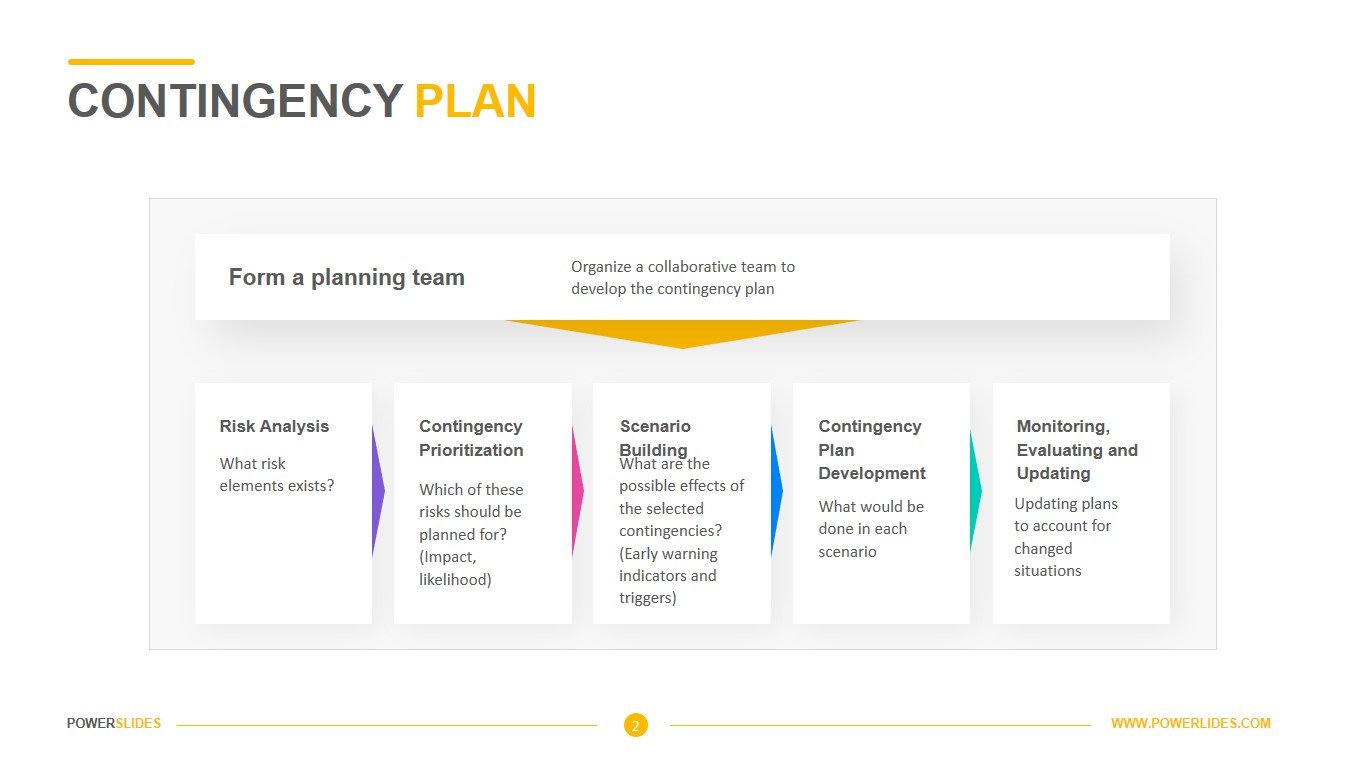
    2. Contingency Planning: Develop contingency plans to minimize the impact of system failures, including backup systems, disaster recovery plans, and incident response protocols.
    3. Compliance and Security: Ensure compliance with relevant regulations and security standards to minimize the risk of data breaches and legal consequences.
    4. Stakeholder Communication: Maintain open communication with stakeholders to manage expectations and address concerns related to potential negative impacts.
    5. Monitoring and Response: Implement monitoring systems to detect and respond to potential issues or failures proactively, minimizing their impact on operations.

    Cybersecurity

    Cybersecurity refers to the practice of protecting computer systems, networks, and data from unauthorized access, cyber attacks, and other malicious threats. It encompasses various technologies, processes, and practices designed to safeguard digital assets and ensure the confidentiality, integrity, and availability of information.

    • Protection of Sensitive Data: Cybersecurity measures help safeguard sensitive data such as personal information, financial records, intellectual property, and proprietary business data from unauthorized access, theft, or misuse.
    • Preservation of Privacy: With the increasing digitization of personal and professional activities, cybersecurity ensures the protection of individuals' and organizations' privacy rights by preventing unauthorized surveillance, data breaches, and identity theft.
    • Business Continuity: Cybersecurity measures help maintain the uninterrupted operation of critical systems and services by preventing or minimizing the impact of cyber attacks, malware infections, and other security incidents. This ensures business continuity and minimizes disruption to operations.
    • Protection of Reputation: A cybersecurity breach can have severe consequences for an organization's reputation and brand image. Effective cybersecurity practices help build trust with customers, partners, and stakeholders by demonstrating a commitment to protecting their information and assets.
    • Compliance with Regulations: Many industries and jurisdictions have stringent regulations and compliance requirements related to data protection and cybersecurity. Adhering to these regulations helps organizations avoid legal penalties, fines, and reputational damage resulting from non-compliance.
    • Financial Stability: Cybersecurity breaches can have significant financial implications, including direct costs associated with incident response, remediation, and legal expenses, as well as indirect costs such as lost revenue, customer churn, and damage to shareholder value.
    • Protection Against Cyber Threats: The cyber threat landscape is constantly evolving, with cybercriminals employing increasingly sophisticated tactics to exploit vulnerabilities and infiltrate systems. Effective cybersecurity measures help organizations detect, prevent, and respond to these threats, reducing the likelihood of successful attacks.
    • National Security: Cybersecurity is essential for protecting critical infrastructure, government systems, and national security interests from cyber attacks and cyber espionage. Strong cybersecurity measures are necessary to safeguard sensitive information and ensure the integrity and security of essential services.

    In summary, cybersecurity is important for protecting sensitive data, preserving privacy, ensuring business continuity, maintaining reputation and trust, complying with regulations, safeguarding financial stability, defending against cyber threats, and promoting national security.

    There are various types of cybersecurity measures designed to protect different aspects of digital systems and information. Some common types include:

    • Network Security: Network security focuses on protecting the integrity and confidentiality of data as it is transmitted across networks. This includes measures such as firewalls, intrusion detection systems (IDS), and virtual private networks (VPNs) to safeguard against unauthorized access and cyber attacks.
    • Endpoint Security: Endpoint security involves securing individual devices such as computers, laptops, smartphones, and tablets from malicious threats. Antivirus software, endpoint detection and response (EDR) solutions, and device encryption are commonly used to protect endpoints from malware, ransomware, and other cyber threats.
    • Cloud Security: Cloud security encompasses measures to protect data, applications, and infrastructure hosted in cloud environments. This includes implementing access controls, encryption, and data loss prevention (DLP) solutions to ensure the security and compliance of cloud-based resources.
    • Application Security: Application security focuses on securing software applications and web services from security vulnerabilities and threats. This includes secure coding practices, penetration testing, and web application firewalls (WAFs) to identify and mitigate potential risks in applications.
    • Identity and Access Management (IAM): IAM involves managing user identities and controlling access to digital resources within an organization. This includes implementing strong authentication mechanisms, identity verification processes, and access control policies to prevent unauthorized access and insider threats.
    • Encryption: Encryption is a fundamental cybersecurity measure that involves encoding data to prevent unauthorized access. This includes encrypting data at rest and in transit using encryption algorithms and cryptographic keys to protect sensitive information from interception and exploitation.
    • Security Awareness Training: Security awareness training educates users and employees about cybersecurity best practices, common threats, and how to recognize and respond to potential risks. This helps raise awareness and build a security-conscious culture within an organization.
    • Virus
    • Worms
    • Spyware
    • Trojans

    Also known as scareware, ransomware comes with a heavy price. Able to lockdown networks and lock out users until a ransom is paid, ransomware has targeted some of the biggest organizations in the world today — with expensive results.

    Data Breach

    A data breach is a security incident in which information is accessed without authorization. Data breaches can hurt businesses and consumers in a variety of ways. They are a costly expense that can damage lives and reputations and take time to repair.

    As technology progresses, more and more of our information has been moving to the digital world. As a result, cyberattacks have become increasingly common and costly. We’ve created a 7-step checklist to use in the case of a data breach. Depending on the severity of the breach and the information exposed, you’ll need to apply some or all of these steps to varying degree. Seven Step Checklist

    Confirm the breach and if your information was exposed

    1. Confirm the breach and if your information was exposed. The first step is to confirm that a breach actually occurred. When a data breach occurs, scammers may reach out to you posing as the breached company to try to obtain more of your personal information. Don't fall for fake emails. Go to the company's secure website and/or call the company to confirm the breach and whether your information was involved.

    Project Teams

    Companies Use Project Terms


    PROBLEM SOLVING

    Teams are able to apply their range of complementary skills with brainstorming.

    DECISION MAKING

    Presented with a number of possible solutions by team in order to make the best.

    CREATE IDEAS

    Interactive teamwork can generate a flood of creative and innovative ideas.


    GREEN

    Lorem ipsum dolor sit amet..

    CERTIFIED

    Lorem ipsum dolor sit amet..

    HARD WORK

    Lorem ipsum dolor sit amet..

    Contribute to Organizational Privacy and Continency Plans


    What we have created

    Benefits

    Athics

    Here is the benifets diagram.

    Components

    Privacy

    Not only your business

    Home Connect

    Protection

    Not only your business


       System Security Demo   

    Password Protaction

    It is very important for anyone password setup

    Protection

    cute cat

    User

    cute cat

    Programmer

    cute cat

    Hardware with Backup


    All software loaded on the network should have first been checked for virus contamination. This also applies to shrink-wrapped (brand new) software. The virus checking program selected should be regularly updated to protect against new viruses. Below the table is my inverstgation

    CapacitySpeed (read/write)Price
    1TB...$59
    2TB...$59
    4TB...$59
    8TB...$59
    SSD 1TB...$159
    SSD 2TB...$359


    disk compare

    CONTACT

    Contact us and we'll get back to you within 24 hours.

    Sydney, Australia

    +61 466799234

    hectorcabra95@gmail.com